Discuz!

 找回密码
 立即注册
查看: 1828|回复: 0

HTML5、Javascript的FC NES模拟器nes-js

[复制链接]

1177

主题

468

回帖

475

积分

管理员

积分
475
发表于 2018-12-10 07:50:33 | 显示全部楼层 |阅读模式

JavaScript NES(Famicom) emulator
http://takahirox.github.io/nes-js/index.html

nes-js

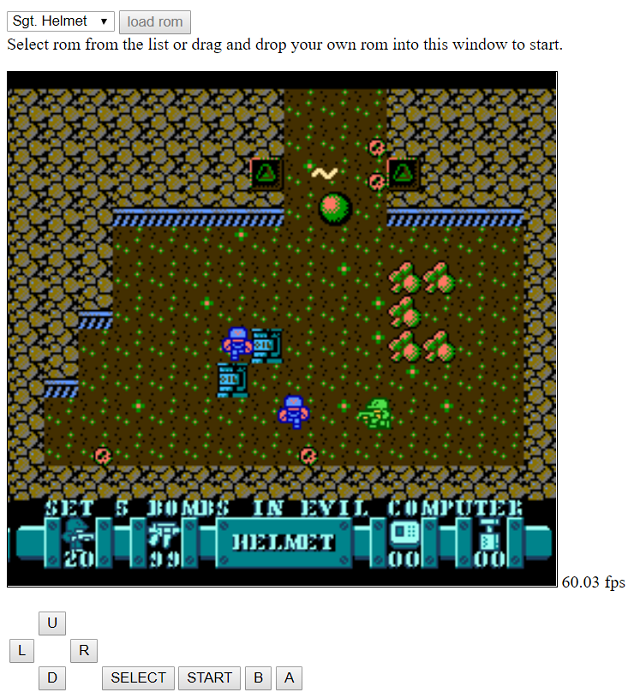
This is JavaScript NES(Famicom) emulator which runs on browser.

Demo
http://takahirox.github.io/nes-js/index.html

Demo with Three.js (It has a performance issue!)
http://takahirox.github.io/nes-js/index2.html

WebVR Demo with Three.js (It has a serious performance issue!)
http://takahirox.github.io/nes-js/index3.html

AR Demo with Three.js and jsartoolkit5 (It has a performance issue!)
https://takahirox.github.io/nes-js/index4.html

Screen shot/


Features

    iNES format rom image support
    Renders with Canvas
    Audio support with WebAudio
    Runs on browser

Browser
How to use

<head>
  <script type="text/javascript" src="https://cdn.rawgit.com/takahirox/nes-js/v0.0.1/build/nes.min.js"></script>
  <script type="text/javascript" >
    function init() {
      var url = 'url to rom image';
      var request = new XMLHttpRequest();
      request.responseType = 'arraybuffer';

      request.onload = function() {
        var buffer = request.response;
        var nes = new NesJs.Nes();

        nes.setRom(new NesJs.Rom(buffer));
        nes.setDisplay(new NesJs.Display(document.getElementById('gameCanvas')));
        nes.setAudio(new NesJs.Audio());

        window.onkeydown = function(e) { nes.handleKeyDown(e); };
        window.onkeyup = function(e) { nes.handleKeyUp(e); };

        nes.bootup();
        nes.run();
      };

      request.open('GET', url, true);
      request.send(null);
    }
  </script>
</head>

<body onload="init()">
  <p>
    <canvas id="gameCanvas" width="256" height="240"></canvas>
  </p>
</body>

NPM
How to install

$ npm install nes-js

How to build

$ npm install
$ npm run all

Default key configuration

This table shows the key - joypad configuration set by

  window.onkeydown = function(e) { nes.handleKeyDown(e); };
  window.onkeyup = function(e) { nes.handleKeyUp(e); };

key         joypad
enter         start
space         select
cursor-left         left
cursor-up         up
cursor-right         right
cursor-down         down
x         A
z         B
APIs

T.B.D.

    NesJs
        Nes
            setRom()
            setDisplay()
            setAudio()
            bootup()
            run()
            handleKeyDown()
            handleKeyUp()
        Rom
        Display
        Audio

TODO

    Performance optimization
    Support more many mappers
    Support unofficial CPU instructions
    Gamepad API support

Links

    Nes Dev
        Nes Dev Wiki
http://wiki.nesdev.com/w/index.php/Nesdev_Wiki
    VR/AR
        Three.js
https://github.com/mrdoob/three.js
        jsartoolkit5
https://github.com/artoolkit/jsartoolkit5
您需要登录后才可以回帖 登录 | 立即注册

本版积分规则

Archiver|手机版|小黑屋|Discuz! X

GMT+8, 2026-9-14 19:08 , Processed in 0.098817 second(s), 20 queries .

Powered by Discuz! X5.0

© 2001-2026 Discuz! Team.

快速回复 返回顶部 返回列表